Ken
Does Athletics

Performance Tracking • Endurance Training • Strength Metrics

Ken Does Athletics – Performance Dashboard

Ken Does Athletics Dashboard

Ken Does Athletics is a Glide-powered training tracker for running, strength, and OCR preparation. It combines structured weekly templates, progressive overload tracking, and real-time mobile logging—so sessions can be captured at the gym or on the trail without waiting to get back to a desktop.

Endurance + Strength Program Planner

One integrated workflow for event prep: long‑run mileage progression, pace durability, incline simulations, and OCR strength blocks (grip/carry/power). Built into weekly templates with targets, completion checks, and simple post‑session reflections to drive adaptations.

Sessions

Create and log workouts in real time. Capture distance, time, sets/reps, load, elevation, RPE, and quick notes. Filter by status (planned, completed, skipped) or type (run, strength, mobility) to focus execution.

  • Mobile‑first quick add during/after sessions
  • Status & type filters; route/venue tagging
  • Light reflection prompts for adaptation tracking

Stats

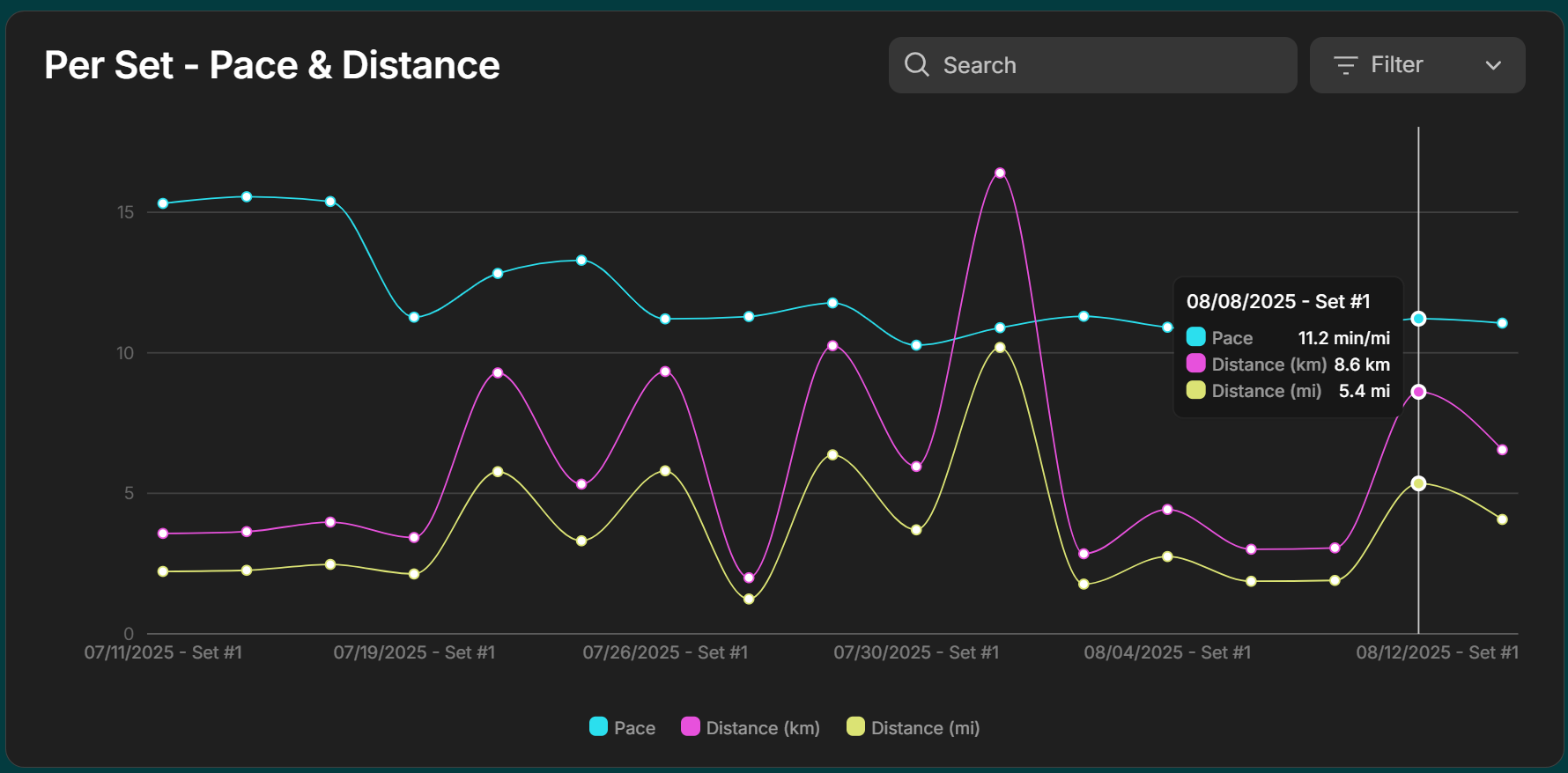
Weekly and block rollups for running volume, pace durability, elevation, and strength workload. Quick deltas vs. prior weeks help you see trend direction at a glance.

  • Volume & intensity rollups by week/block
  • Best‑to‑date / recent‑trend indicators
  • Export‑ready for deeper analysis in R/Tableau

Dashboard

High‑level overview of the current training block: mileage this week, strength trendlines, upcoming targets, recovery flags, and sessions remaining to hit the plan.

  • At‑a‑glance metrics and next actions
  • Block progress vs. planned targets
  • Highlights potential risk (e.g., rapid spikes)

Templates

Reusable weekly plans and session blueprints for endurance + strength blocks. Copy, tweak, and publish to your calendar in minutes.

  • Pre‑built base/build/peak schemes
  • Session blueprints (long‑run, tempo, grip/carry)
  • Fast copy/modify for personalized cycles

Goals & Frameworks

Macro/meso planning for events: goal pace, long‑run ladder, strength emphasis, and milestone dates. Aligns the week‑to‑week template with race goals.

  • Event goals & A/B/C targets
  • Long‑run ladder & key sessions map
  • Plan‑to‑actual review checkpoints

Activities

A catalog of movements and exercises performed by all athletes. See trends, frequencies, and performance across sessions.

  • Last performed date for each activity
  • Your number of entries vs overall totals
  • Links to session detail & stats view

Athletes

Profiles of users / competitors: stats, sessions, and activity summaries. Ideal for comparing performance, progress, and consistency.

  • Baseline metadata (name, height, weight, etc.)
  • Stats & session count summaries
  • Activity performance breakdowns

Locations

Track common routes, tracks, gyms, and hills. Compare splits and elevation on familiar terrain to gauge progress without new‑route noise.

  • Route library with tags (terrain/elev/gym)
  • Repeatability for like‑for‑like comparisons
  • Context tied back to Sessions and Stats

Back‑End Tasks

Admin utilities to keep the data clean and fast: bulk edits, archive/restore, field fixes, and occasional ETL touches when datasets grow.

  • Bulk status changes / corrections
  • Archive/restore old blocks
  • ETL hooks for pruning & performance

Benefits & Limitations

Front‑end (Athlete) — Benefits

  • Unified strength & endurance workflow – avoids juggling separate apps like StrongLifts 5×5 (lifting), Strava (running), or Runna (run coaching).
    Why it matters: One place for planning and logging hybrid training so context isn’t lost across apps.
  • Mobile‑first hybrid logging – faster for gym+cardio days than apps that silo activities (e.g., Garmin Connect, GymBook, Fitbod).
    Why it matters: Capture the whole session on the spot without splitting entries or retyping notes later.
  • Custom templates & targets – periodize lifting cycles and weekly mileage in one system (vs single‑discipline tools like Fitbod or Nike Run Club).
    Why it matters: Hybrid athletes can plan across disciplines without paying for multiple subscriptions.
  • Actionable, forward‑looking dashboard – shows next lifts/runs, block progress, and risk flags (most consumer apps emphasize history).
    Why it matters: You see what’s coming and whether you’re on track—an edge usually found in coaching suites like TrainingPeaks/TrueCoach.
  • Route/location tagging – benchmark the same terrain, hill, or track over time (rare in strength apps like Strong, FitNotes).
    Why it matters: Like‑for‑like route comparisons make progress and pacing durability clearer.
  • Reflection prompts – lightweight post‑session notes to adapt the plan (static plan apps like Peloton, StrongLifts won’t nudge you).
    Why it matters: Encourages adjust‑as‑you‑go based on fatigue, recovery, and life constraints.

Front‑end (Athlete) — Limitations

  • Visual polish/interactive charts not at Garmin/Strava level yet – fewer heatmaps, pace breakdowns, race predictors.
    Why it matters: If you want deep on‑device graphs (e.g., Garmin Connect, Coros, Stryd) you’ll export for analysis.
  • No device integration – no auto‑import from watches, HR straps, or gym equipment.
    Why it matters: Manual entry is required; competitors pull from Garmin/Apple/Fitbit automatically.
  • No full offline logging – competitors like Strava, Strong, Garmin Connect allow offline capture and later sync.
    Why it matters: Training in low‑signal areas may need a temporary note and later transcription.
  • Simpler run analytics vs run‑specialists – fewer native pacing charts/segment insights than Garmin/Coros/Stryd.
    Why it matters: Serious racers may miss built‑in race predictors and advanced pacing diagnostics.
  • Manual database entry for new items – additions must be typed (no global library with auto‑suggest/anatomy media).
    Why it matters: Slower setup than platforms like Fitbod, Strong, TrainHeroic, JEFIT that offer search, muscle diagrams, and demo videos.
  • Multi‑segment session entry slower – strength‑only apps (FitNotes, Jefit) have quicker superset/set‑builder UX.
    Why it matters: Circuits/mixed sessions take longer to enter on mobile.
  • Mobile tables can feel cramped – competitors often use condensed card layouts with swipe navigation.
    Why it matters: Long logs are less efficient to scan on small screens.

Back‑end (Admin) — Benefits

  • Flexible data handling – primary store in Glide Tables, with optional Google Sheets for external bulk edits or transformations via manual CSV export/import.
    Why it matters: Even on the free plan (no live Sheet link), you can still process large one-time changes outside Glide. Ongoing syncs require extra steps or an Apps Script workflow.
  • Reusable Templates & Targets – coach‑style planning without heavy admin.
    Why it matters: Clone/tweak cycles quickly; keep plans consistent and reduce manual errors.
  • Admin efficiency – bulk edits, archive/restore, quick field fixes inside Glide’s Data Editor.
    Why it matters: Less busywork than multi‑step coaching portals; faster to maintain.
  • Admin CSV export (from data editor) without API paywalls.
    Why it matters: You can run custom analytics in Excel/R/Tableau or blend with other sources whenever you need.
  • Lightweight ETL hooks (via Sheets or Apps Script) to pre‑compute heavy metrics.
    Why it matters: Offloading calculations keeps the app snappy as data grows.
  • Free tier flexibility – prototype features at minimal cost.
    Why it matters: Low-risk environment to test ideas before committing budget (although, if I’m being honest, the time spent dealing with limitations is limiting my income).

Back‑end (Admin) — Limitations

  • Computed columns/relations at scale – complex lookups/rollups can feel slower with big tables.
    Why it matters: Periodic pruning and pre‑computing (in Sheets/Apps Script) help keep performance fast.
  • Free tier data tooling is basic – no “replace all,” no version history/undo in Glide Tables.
    Why it matters: Bulk transforms and safe rollbacks are easier in external tools such as Google Sheets or Microsoft Excel; keep backups for critical tables.
  • End‑user CSV download not available on free plan – exports are admin‑side only.
    Why it matters: If users need files, you’ll add a workaround (Apps Script link, email attachment, or host static CSVs).
  • No native automation engine – advanced workflows need Apps Script or external services.
    Why it matters: Requires more technical setup and error handling for reliable automations.
  • Schema drift risk with ad‑hoc edits.
    Why it matters: Set simple governance (naming rules, change logs, staging tabs) to avoid broken references and calc errors over time.